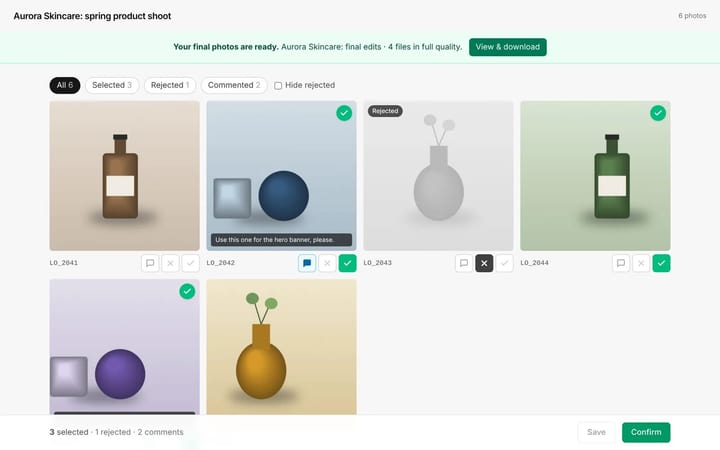
How to manage client photo selections, feedback and revisions
A repeatable proofing process: curate the gallery, preserve filenames, confirm the list and close each revision round. Includes Photoproof.io, Pixieset and Picflow.

The difficult part of client proofing is often the decision, not the upload. A client favorites twenty photographs, a colleague emails a different list, and a third person requests edits on screenshots without filenames. You can spend more time reconciling those messages than retouching the chosen images. A good workflow gives every photograph a stable identity and every round a clear purpose.
This guide proposes a repeatable process from the first shortlist to final delivery. The example quantities and deadlines are planning choices, not industry rules. Adapt them to the package and working relationship you agreed. Choose software after deciding how selections, comments and approvals should move through the project.
| Stage | Client action | Record to retain |
|---|---|---|
| Selection proofs | Choose the agreed images | Stable filenames and a confirmed list |
| Retouch review | Request specific changes per image | File-linked notes and the review version |
| Revision approval | Confirm the changes are complete | The approved version and date |
| Final delivery | Download and check the agreed files | Delivery details and the retention arrangement |
Define what the client is choosing
Before sharing a gallery, explain whether the task is selecting images for retouching, choosing album photographs or approving already finished work. These are different decisions. A favorite may express interest without approving the crop, color or final delivery. Avoid asking one button to carry meanings that neither side has explicitly agreed.
For a portrait package containing ten finished photographs, you might ask the client to choose ten from a curated proof set. For a commercial assignment, the client may need one hero image, three supporting views and a specific horizontal crop. Describe those needs in the gallery instructions so the selection reflects the intended use rather than an unexplained total.
Edit the proof set before sending it
Remove accidental exposures, obvious missed focus and redundant near-duplicates. Retain meaningful alternatives in expression, framing or use. The client should be making decisions that benefit from their input, not performing the photographer's entire initial edit. A smaller coherent set can make the differences easier to evaluate, but do not hide required coverage merely to achieve a neat number.
Apply enough consistent processing that exposure and white balance do not distract from selection. Explain what remains unfinished, especially skin retouching, background cleanup or composite work. A proof should be honest about the current state of the image. Do not imply that a technically unusable frame will become an accurate finished photograph through unspecified editing magic.
Keep filenames stable across the whole job
Give each proof a recognizable code that maps back to the source file. Preserve that relationship through the editing application, online gallery and delivery folders. If the client selects JOB_0142, you should be able to identify the corresponding source without searching by appearance. Avoid renaming proofs sequentially after culling unless you maintain a reliable mapping.
Test the round trip before sharing a large assignment. Upload a handful of proofs, make sample selections and export or copy their identifiers. Confirm that the returned codes match the files in your editing system. Gallery order, screenshot position and the phrase “the third one” are fragile identifiers because filtering and sorting can change them.
Choose a tool for the decision you need
Photoproof.io documents link-based galleries where clients select, reject and comment, then confirm a selection that locks. It also provides photo codes and CSV export. Pixieset combines gallery proofing with delivery and selling tools. Picflow documents file-based comments, annotations, labels and approvals. These are descriptions of vendor features, not results from a comparative hands-on test.
For a straightforward portrait selection, a simple confirmed list may be sufficient. A design team discussing precise changes across several files may benefit from annotations and more explicit review states. If print sales are part of the job, evaluate that journey as well. Check the current plan's limits and test the client experience on a phone before committing a real project.
Give one person responsibility for the final list
Several people can contribute opinions, but somebody needs to resolve conflicting choices. Ask the client to identify that person. For a family session it may be one parent; for a campaign it may be the producer or marketing lead. This does not prevent discussion. It establishes who tells you which decision to act on.
Set a selection deadline and a simple status vocabulary, such as awaiting choices, confirmed for editing, awaiting revision approval and delivered. If more than one person maintains a list, agree how the lists will be combined. Do not assume that adding every favorite from every reviewer produces an approved final set.
Keep revision notes attached to individual files
A useful note identifies the image, the requested change and any reference needed to interpret it. “JOB_0142: please remove the small mark on the left sleeve” is actionable. “Make the whole gallery more premium” requires a conversation about the intended result. Ask for a representative reference or a specific adjustment before applying a vague instruction to dozens of files.
Separate a correction to the agreed edit from a new selection, an additional image or a changed creative direction. Refer back to the agreed revision allowance and discuss additions before doing substantial extra work. Keep the language practical and neutral: what changed, which files are affected, and how that affects the next delivery.
Close each round before opening the next
Save a dated record of the confirmed selection and the comments you are acting on. When a client changes a locked list, record which images were replaced and whether work has already started. A lock is a useful workflow boundary, not proof that the client can never change their mind. Handle the change explicitly so both sides understand the current state.
Name successive review sets clearly, for example Retouch review 01 and Retouch review 02. Make the current version obvious and retire confusing duplicate links where the platform permits. A client should not have to compare three galleries to discover which one contains the latest changes.
Deliver with a short, specific handover
Provide the agreed files with clear names, dimensions and intended uses. State the download deadline and your retention arrangement. Keep your own backup process separate from the convenience of a delivery gallery. Before closing the job, verify that the client can open the files and identify the approved version.
A suggested selection message is: “Please choose ten photographs for final editing by Friday. Use each image's comment field for specific notes, then confirm your final list. These are selection proofs; the chosen files will receive the agreed finishing work.” Replace every number and promise with the actual project terms. Clear instructions make the gallery a decision tool and give the next stage an unambiguous starting point.